Sparx Enterprise Architect and Archi are both excellent at what a single project needs. The trouble starts one project later, when a repository was built for one pair of hands at a time, or when the next project quietly re-models an application, a capability or a service that another project already described — under a slightly different name. CelinQ removes both walls without asking anyone to leave the tool they already know.
Watch it work
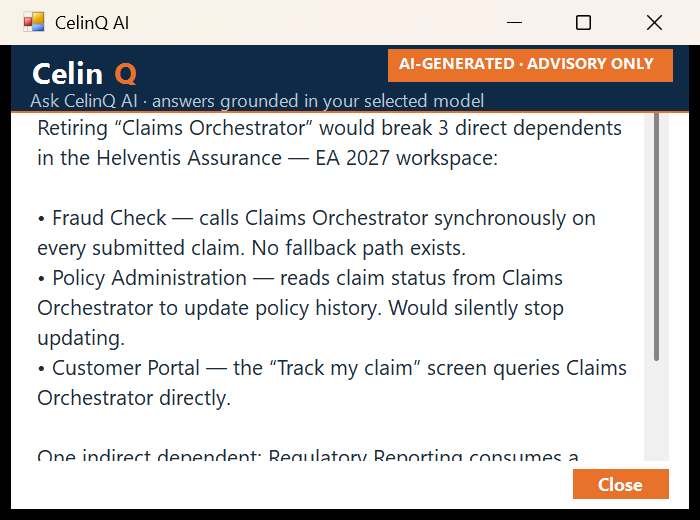
The clearest way to explain CelinQ is to show the actual sequence a change goes through — not an abstract diagram of "AI" and "merging," but the real path from a plain-language description to a governed model change. No actors, no staged data: what's below is the real product, doing the thing.
How CelinQ works
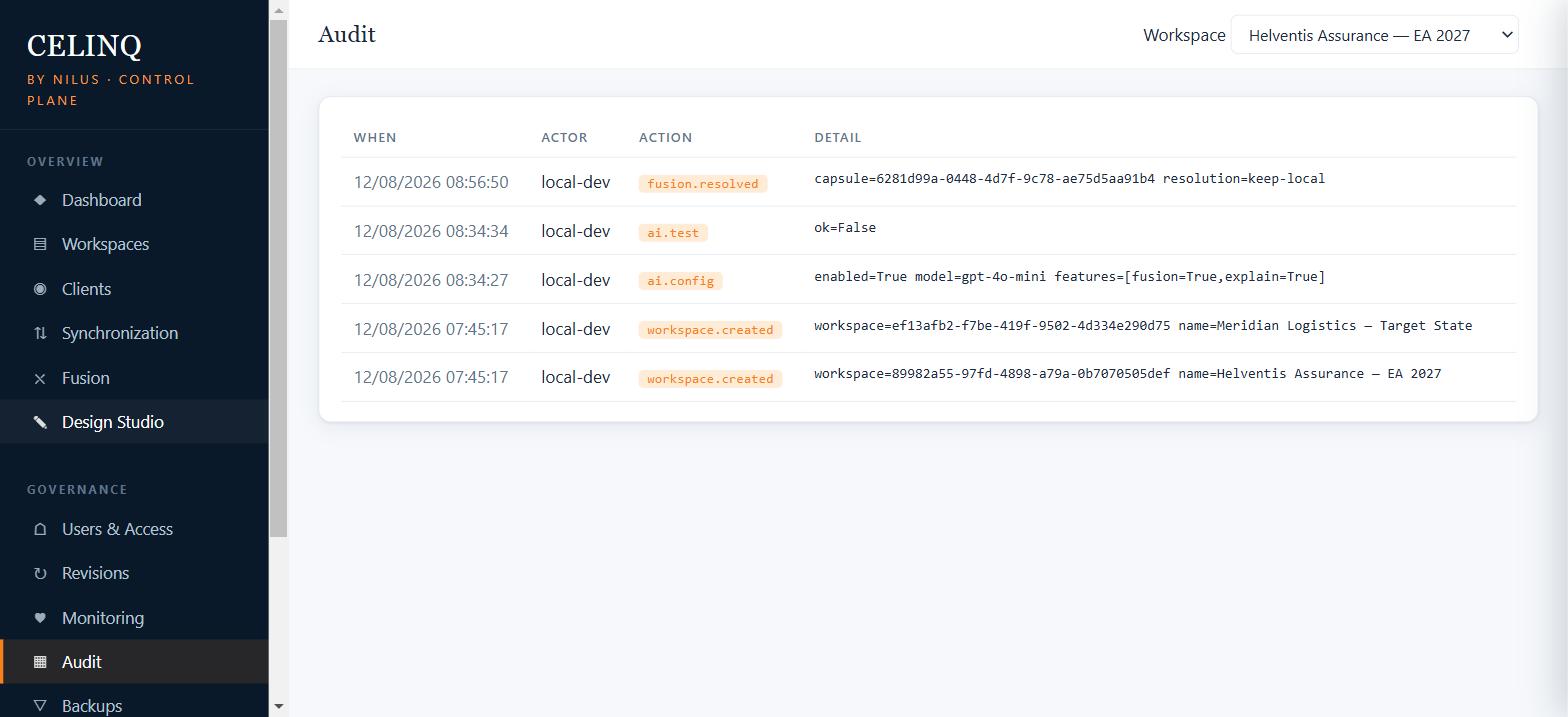
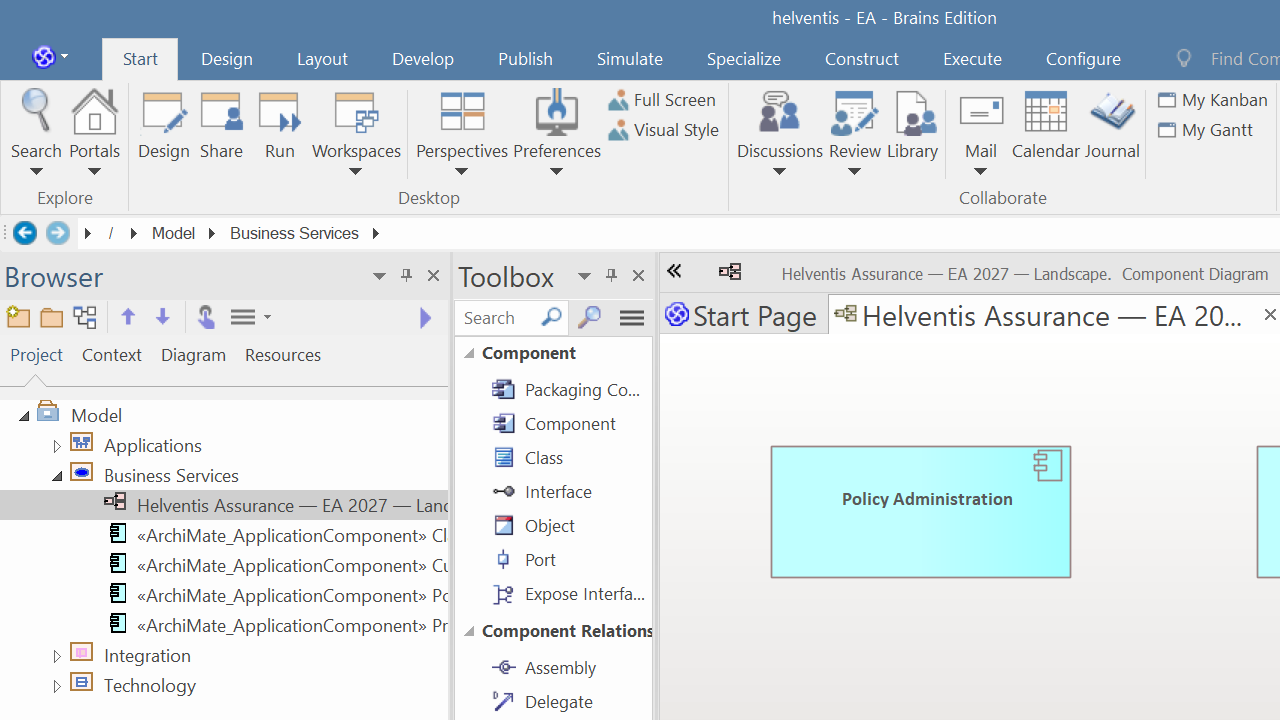
CelinQ sits alongside Enterprise Architect and Archi rather than replacing either. Each architect keeps working in their own local repository — fast, responsive, and usable with or without a network connection. A small companion service watches that local repository and keeps it in step with a shared workspace on a central CelinQ server that your organisation runs. Save in EA or Archi, and your changes travel to the server; when a colleague's changes arrive, they appear in your model. No file locks, no waiting your turn, no manual export and import — and no new modelling client to learn.
Keep working in EA or Archi
Everyone edits their own local repository at full speed. Offline on a plane or behind a slow client VPN, the tool stays responsive because nothing depends on a live connection to a shared file.
Changes flow both ways
A background companion detects each save and exchanges just the changes with the shared workspace. Smart Sync adapts its rhythm — quick during hot collaboration, calm when you are heads-down.
CelinQ Fusion reconciles
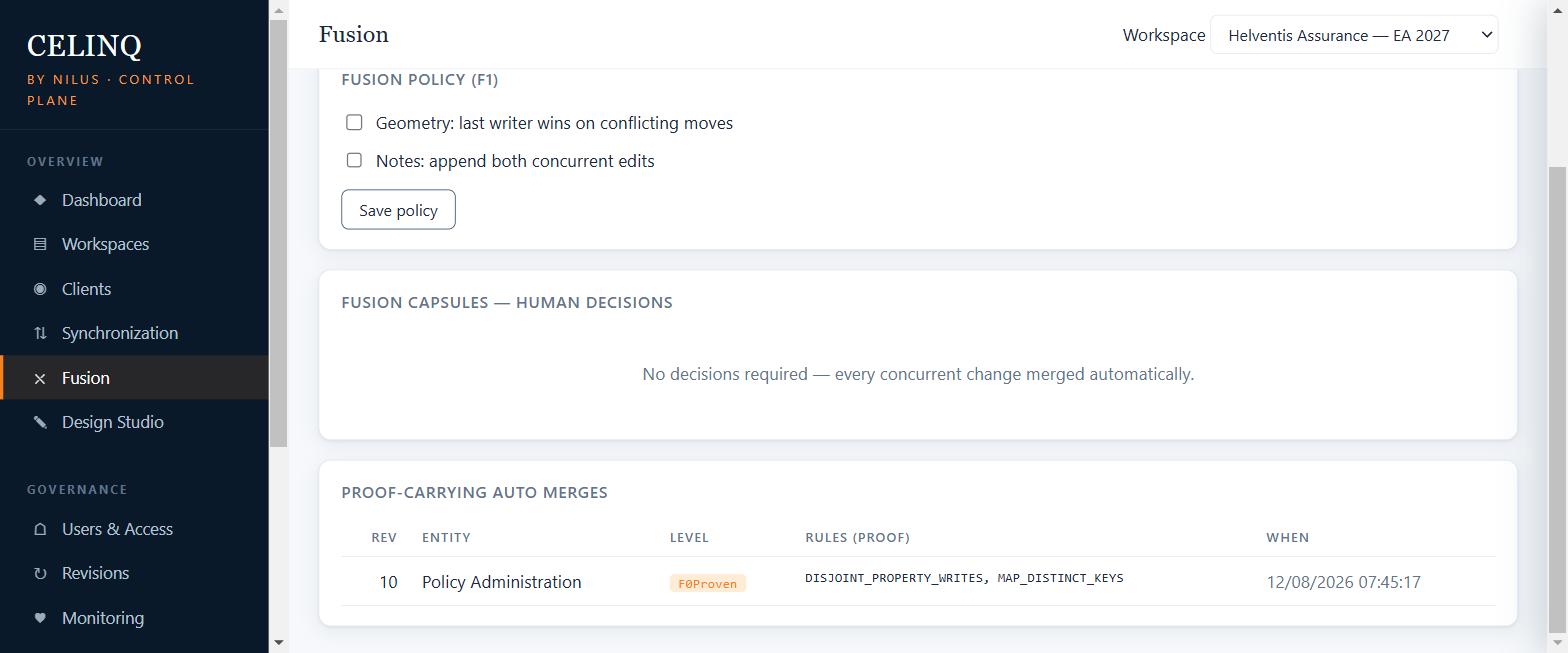
When two people touch the model at once, a deterministic three-way merge combines their work at a fine grain. Genuine conflicts are isolated and surfaced, never silently resolved by whoever saved last.
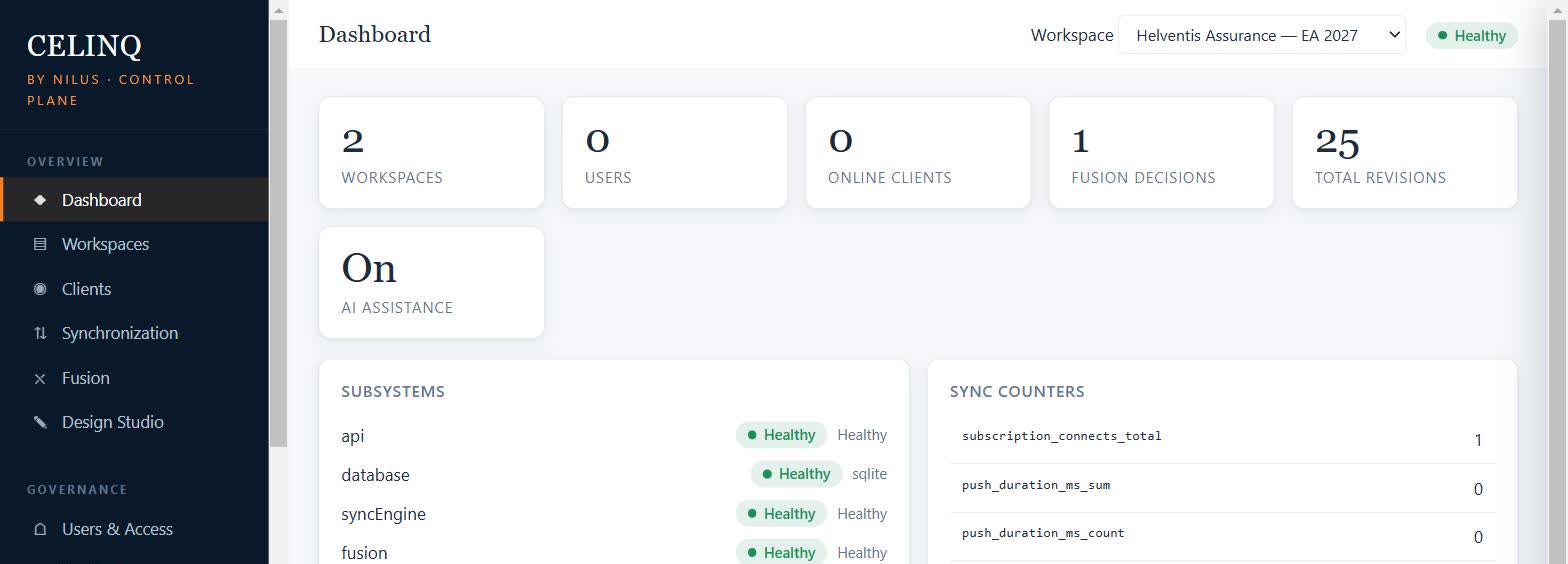
One workspace, not one file per project
Project by project, both Enterprise Architect and Archi practices tend to fragment the same way: Project A models an application because nothing describes it yet, and a year later Project B models the same application again, under a different name, because nobody knew Project A's file existed. Every individual file can be perfectly correct. Across projects, the organisation ends up with several representations of the same enterprise.
CelinQ's answer isn't "merge every file into one undifferentiated repository." Projects keep their own views, their own pace, their own ownership. What they stop doing is re-describing an application, capability or service that the organisation already knows about — because that knowledge now lives in one shared, governed workspace instead of scattered across independent project files.
Your projects are separate. Your architecture is not. A new project should not start from an empty model. See the full story: from document-based to model-based architecture →
AI proposes. You approve.
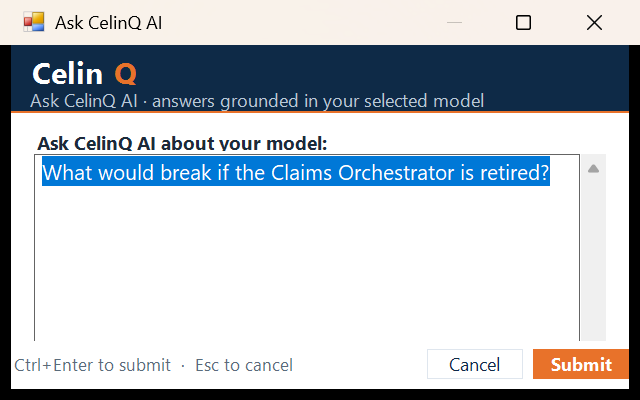
CelinQ includes an optional design assistant you reach from Enterprise Architect's own
menu — Ask CelinQ AI, Analyze Selected Package,
Generate into Selected Package — without switching to another window. Select
a package, describe in plain language what you want — "add a Fraud Check service that
guards the Claims Orchestrator" — and the elements and relationships are drafted directly
into that package as real model content, previewed before anything is applied. Ask the
other way round and you get a grounded reading of the part of the model you selected, with
answers that name the actual elements involved rather than a generic summary.
The fuller AI-for-Sparx-EA story → For
requirements-shaped input specifically —
a project brief, a stakeholder email, a rough
requirement — see the fuller requirements-to-architecture story →
This is the trust boundary that matters most: an LLM never gets unrestricted write access to a governed architecture. Every proposal is validated deterministically, previewed, and requires a person to approve it — edited, rejected, or accepted as-is — before it becomes a real, synchronised, versioned model change. Missing information stays a visible, named gap instead of being quietly invented into false precision.
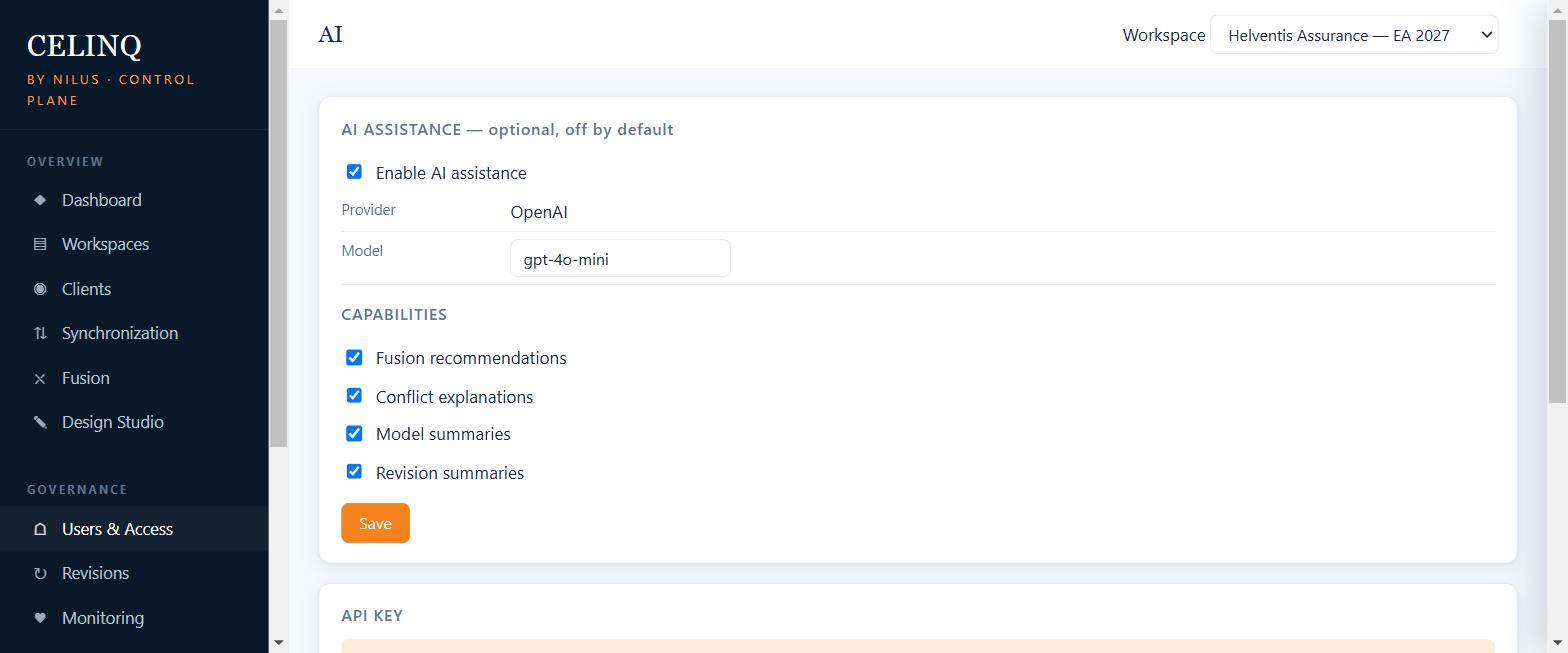
The request starts on your machine, but the call to the AI provider never does: the add-in never talks to a provider directly. It hands the question to the local CelinQ Connect agent, which relays it to the CelinQ Server — the same server holding your workspace — and only that server calls the provider, and only if an administrator has switched the capability on. Nothing about this changes what stays local: your model, your merges and your history never depend on it. Sovereign and customer-hosted deployment patterns →
Your tracker manages the work. Your architecture should explain what satisfies it.
Jira and Azure DevOps are genuinely good at what they do: a requirement's status, its owner, its sprint. Neither can tell you which system actually satisfies that requirement, which service implements it, or what else would break if it changed — and they were never meant to. That's an architecture question, and it can only be answered by a model that is current enough, and shared enough, to actually ask.
CelinQ doesn't replace your tracker. It answers the question the tracker was never built to answer: deterministic dependency queries — what depends on this, what does this depend on — run directly against the shared architecture, not against whichever project file you happen to have open. How shared context makes these questions answerable →
CelinQ Fusion: merging you can trust
Once several architects, and AI-assisted proposals, are all touching the same shared architecture, the obvious next question is how you keep it trustworthy. The heart of CelinQ's answer is its merge engine, Fusion. Most tools that claim to support collaboration fall back on "last write wins" — whoever saves most recently overwrites everyone else. That is not merging; it is data loss with good manners. Fusion instead performs a proper three-way reconciliation: it knows the common ancestor of two versions and can therefore tell the difference between a change one person made and a change the other made, combining both when they do not overlap.
It works at the level of individual model facts rather than whole diagrams or packages, so two architects editing different attributes of the same element, or different elements in the same package, simply both succeed. When two people genuinely change the same thing in incompatible ways, Fusion does not guess. It preserves both versions, marks the point of contention, and lets a human decide — with full context about what each side intended. Deletions are handled with tombstones rather than silent disappearance, so a colleague's in-progress work is never destroyed by someone else's cleanup. The whole process is deterministic: the same inputs always produce the same result, which is what makes it safe to trust and possible to audit.
No intelligence required in the core. Fusion is a rules-based, reproducible engine. It does not depend on any external service or network intelligence to merge your model — which is exactly why it is safe to rely on for work you cannot afford to lose.
What you get
Every change, recorded
A complete, ordered history of the workspace: who changed what, when, and against which prior revision. Roll back a bad edit; understand how the model arrived where it is. How restore behaves when laptops kept working →
Review before it lands
Roles from Viewer through Editor to Administrator and Owner. Changes can be reviewed and controlled so the shared model reflects deliberate decisions, not accidents. Audit trails public-sector work actually needs →
See who is in the model
Lightweight presence shows who else is active right now, so coordination happens naturally instead of through a stream of "are you in the file?" messages.
Your data stays yours
The server runs on infrastructure you choose — on-premises or in your own cloud. Nothing about your model has to leave your control. Built in Brussels; ideal for public-sector and regulated work.
Authenticated and encrypted
Token-based authentication, hashed credentials, encrypted transport with certificate pinning between the companion and the server. Access is deliberate and verifiable.
One workspace, two clients
Enterprise Architect and Archi synchronise through the same server and the same Fusion merge engine — not two separate products glued together.
Technical specifications
| Works with | Sparx Enterprise Architect (in-process add-in plus a companion sync service), existing .eap/.eapx repositories used as-is; and Archi, the free ArchiMate modelling tool — both clients synchronise through the same server and Fusion merge engine. |
|---|---|
| Collaboration model | Local-first: each author edits an independent local repository; changes synchronise to a shared central workspace. |
| Merge engine | CelinQ Fusion — deterministic three-way merge at model-fact granularity, with tombstones, conflict isolation and reproducible results. |
| Sync | Smart Sync with adaptive cadence (responsive during active collaboration, quiet when idle), plus manual and fixed-interval modes. |
| AI assistance | Optional, off by default. Requirements/intent to proposed model elements and relationships; every proposal previewed and human-approved before it lands. Provider configurable (OpenAI, Azure OpenAI, Anthropic, or any OpenAI-compatible self-hosted endpoint); sovereign mode removes it entirely. |
| Authentication | Personal access tokens today (PBKDF2-SHA256 hashed, shown once at issue). OIDC SSO — Entra ID, Keycloak, Okta — is the planned next step; the role model already fits it. |
| RBAC | Workspace roles, strictly ordered: Viewer < Editor < Administrator < Owner, enforced server-side on every call. Azure AD/Entra-issued roles are on the OIDC roadmap above, not shipped yet. |
| History & governance | Ordered revision history per workspace; change review; a full audit log of user, token, membership and workspace actions. |
| Server | Runs on your own infrastructure. Storage on SQLite for small teams or PostgreSQL for larger deployments. |
| Security | Token authentication (PBKDF2-SHA256, constant-time compare), encrypted transport with certificate pinning, workspace authorization re-checked on every call — not just at login. |
| API surface & gateways | gRPC for sync, REST for the Control Plane and admin API. CelinQ has no built-in API gateway — the documented guidance is to deploy it behind your own reverse proxy or API gateway (rate limiting, WAF) when exposed beyond a trusted network. |
| Data residency | Fully sovereign. No dependency on any external service for core collaboration or merging. |
Honest about what's shipped versus planned: Entra ID/Azure AD sign-in and an API gateway are both on the roadmap, not in the product today. What's live is documented above — token auth, workspace RBAC, and a server that expects to sit behind your own network edge.
Start with five
If you read nothing else, these five cover the core of what makes CelinQ different.
Proof-Carrying Merges
How automatic conflict resolution explains itself, one rule at a time.
Centralized vs Local-First
The flagship comparison: what each approach actually buys you.
Data Residency for Architecture
Why where the model lives is not a detail for public-sector work.
From Prompt to Production Model
One workshop request, followed end to end through validation and audit.
Questions we actually get asked
Is CelinQ affiliated with Sparx Systems, Enterprise Architect, or The Open Group?
No. CelinQ is an independent product built by NILUS. It works alongside Enterprise Architect and can round-trip ArchiMate content, but it is not endorsed by, or affiliated with, Sparx Systems or The Open Group.
Does CelinQ replace Enterprise Architect or Archi?
No. Every architect keeps modelling in the tool they already use, exactly as before. CelinQ is the layer underneath that connects those models into one shared, governed architecture — it adds sync, merging and governance; it does not add a second modelling client to learn.
Where does the CelinQ Server run?
Wherever you choose: on-premises, in your own Azure subscription, or fully air-gapped. Nothing about core collaboration or merging depends on an external service — see deployment patterns for the honest account of what is production-ready today.
What happens when two architects edit the same thing?
Fusion, CelinQ's merge engine, reconciles non-overlapping changes automatically and proves each auto-merge safe with a specific rule you can inspect. Genuine conflicts — two people changing the same fact in incompatible ways — are never guessed at; they are preserved and handed to a person to decide. See proof-carrying merges.
Is the AI assistant required, or does it see our model by default?
Off by default, on every server. An administrator switches it on deliberately, feature by feature, and only that server ever talks to the AI provider — the add-in never does. Every proposal is previewed and requires a human to approve it. Sovereign mode removes external AI entirely and irreversibly for organisations that cannot accept it at all.
How do I try CelinQ?
Request a trial with a rough sense of your team, your repository, and whether you use Enterprise Architect, Archi, or both. Requests are reviewed by hand before a dedicated trial environment is provisioned — there's no self-service signup, and no obligation to book a sales call just to see it.
What does CelinQ cost, and how long does a rollout take?
It depends on team size and how you deploy — SQLite for a small team, PostgreSQL for a larger one, on your own infrastructure either way. Request a trial with a rough sense of your team and repository, and we will give you a straight answer rather than a generic number.
Eighty pieces, one repository that finally behaves
We have written at length about the specific ways single-user modelling breaks down in real teams — from merge anxiety and lost work to sovereignty, onboarding, governance and disaster recovery — and gone deeper still into performance, synchronisation, conflict resolution, operations and governed AI. Start reading below.
Request a trial
Not a self-service signup, and not a sales call you have to book just to see the product. Tell us roughly what you'd want to evaluate; a person reviews the request and, if it's a fit, provisions a dedicated trial environment — typically 14 days, seeded with a scenario matching what you asked about.
Get in touch
Prefer email to a form? Tell us roughly how big your team and repository are, and whether you're thinking SQLite or PostgreSQL, on-premises or your own Azure subscription. We'll give you a straight answer, not a sales process.
1200 Brussels, Belgium